Your website can have a beautiful design, perfect typography and polished animations.
But open it in a browser tab with a missing, blurry or badly cropped favicon and suddenly something feels unfinished.
That tiny icon matters.
And creating all the favicon files required by modern browsers, mobile devices and web apps shouldn’t require opening five different tools, manually resizing images, searching documentation and wondering which files are still relevant in 2026.
That is exactly why I rebuilt my Modern Favicon Generator.
The tool has been redesigned with a cleaner interface, smarter icon controls, better previews and a modern favicon generation workflow designed around the way websites actually work today.
Upload one image.
Customize it.
Preview it. 🔥
Generate everything.
Done.
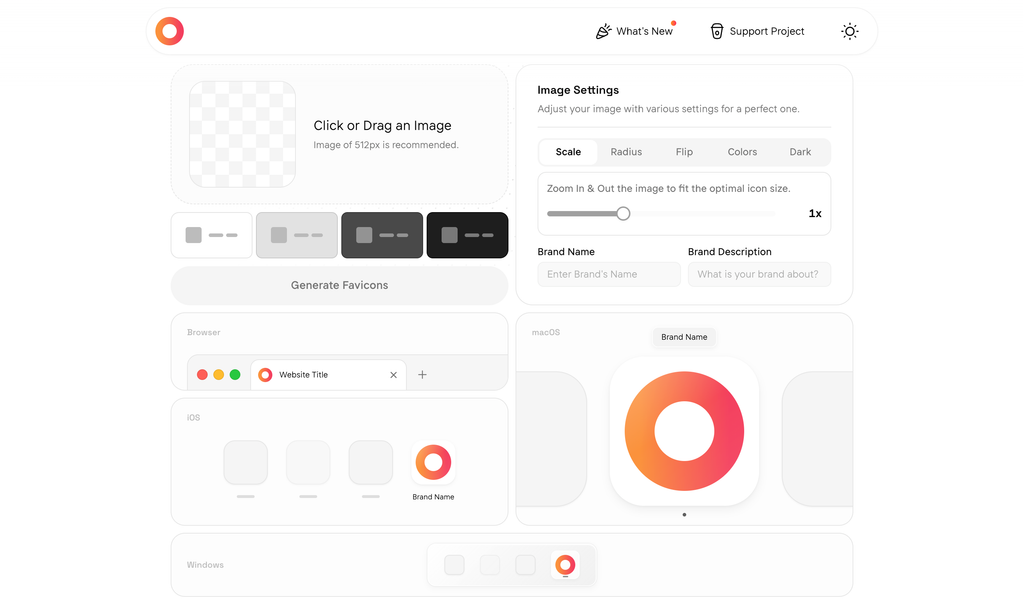
A Favicon Generator Built for the Modern Web
Favicons have changed.
They are no longer just tiny favicon.ico files sitting inside the root directory of a website.
Your brand icon can appear across:
- Browser tabs
- Browser bookmarks
- iPhone and iPad home screens
- Android home screens
- Progressive Web Apps
- Desktop environments
- App launchers
- Different light and dark interfaces
That means developers and designers need more than a single 16×16 image.
But they also shouldn’t have to generate dozens of unnecessary legacy files.
The new Modern Favicon Generator focuses on creating a practical favicon package for today’s web without filling your project with obsolete assets.
Upload One Image. Generate Your Favicon Set.
The workflow starts with one source image.
You can upload:
- PNG
- JPEG
- WEBP
- SVG
A high-quality square source image is recommended, and from there the generator handles the rest.
No Photoshop workflow.
No manually exporting different dimensions.
No jumping between favicon websites.
Just upload your logo or icon and start creating.
Your Logo Doesn’t Quite Fit? Fix It Directly in the Generator.
One of the biggest improvements in the redesigned favicon generator is the ability to adjust your artwork before generating the final files.
Scale Your Icon
Maybe your logo fills too much of the available space.
Maybe it looks tiny inside a browser tab.
Use the scaling controls to zoom your artwork in or out until the proportions feel right.
You can instantly see how the change affects the icon.
Add Rounded Corners
Want a softer, app-style appearance?
Adjust the corner radius directly inside the generator.
You can move from sharp corners to a more rounded icon without editing the original image.
Flip Your Artwork
Need to quickly experiment with orientation?
Flip the icon horizontally or vertically directly from the interface.
It is a small feature, but incredibly useful when testing different visual directions.
Control Your Favicon Colors
A favicon should feel like part of your brand, not like an image that was randomly dropped into a square.
The new generator gives you control over important colors including your:
Icon background
Choose the background surrounding your artwork.
Brand color
Set a color that better represents your website or application.
These options make it easier to create an icon package that feels consistent with the rest of your brand.
Create a Favicon That Works in Dark Mode
Dark mode is no longer an edge case.
A large percentage of users browse websites with dark interfaces, which can create a problem for icons designed exclusively for light backgrounds.
A dark logo on a dark browser interface can practically disappear.
The Modern Favicon Generator can create an icon.svg with a dark-mode background variant so your favicon can adapt more naturally to different interface themes.
That means better visibility without maintaining completely separate favicon workflows.
Your favicon should look good at 2 PM.
And at 2 AM.
Preview Before You Generate
Guessing is expensive.
Especially when the thing you’re designing will appear differently depending on the platform.
The redesigned favicon generator includes visual previews designed to help you understand how your icon may feel across environments such as:
Browser
See how your favicon works alongside a website title.
iOS
Preview your icon in a mobile-style context.
macOS
See how your brand identity translates into a desktop environment.
Windows
Check another important desktop presentation before generating your files.
Make an adjustment and see the result immediately.
What you see becomes much closer to what you ship.
One Icon. Every Platform.
Once everything looks right, click Generate Favicons.
The generator creates a carefully selected modern favicon package containing the files websites actually need.
favicon.ico
The classic favicon format used by browsers, tabs and bookmarks.
icon.svg
A scalable vector favicon for modern browsers.
SVG is especially useful because your artwork can remain sharp at different sizes.
apple-touch-icon.png
Designed for Apple device experiences such as home-screen icons.
icon-192.png
A commonly used application icon size for Android and Progressive Web App experiences.
icon-512.png
A larger application icon suitable for modern PWA experiences.
icon-maskable-512.png
A maskable icon created for environments where the operating system may display application icons using different shapes.
manifest.webmanifest
A ready-to-use web app manifest containing the icon information your application needs.
No enormous folder containing every favicon convention invented over the last two decades.
Just a clean, modern output designed to make implementation easier.
Why Maskable Icons Matter
Ever installed a web app on Android and noticed that its logo suddenly looks tiny, gets surrounded by unwanted whitespace or appears awkwardly cropped?
That is one of the problems maskable icons are designed to solve.
Different devices can display application icons using different shapes.
Circle.
Rounded square.
Squircle.
Or another platform-specific mask.
A maskable favicon gives the operating system enough safe space to apply those shapes while keeping the important parts of your logo visible.
The Modern Favicon Generator automatically includes a dedicated maskable icon in the generated package.
For developers building modern websites and PWAs, that is one less detail to configure manually.
Download Everything in One Click
Once generation is complete, download your favicon package as a ZIP file.
Inside are the favicon assets you need to integrate the icon into your project.
No downloading individual files one by one.
No manually renaming exports.
No rebuilding the same assets every time a client changes their logo.
Generate.
Download.
Ship.
Designed for Developers, Designers and Website Owners
I originally built this favicon generator because something this common should not be unnecessarily complicated.
The redesigned version takes that idea much further.
For Web Developers
Generate a modern favicon package quickly instead of maintaining a manual favicon-export workflow for every project.
For Freelancers and Agencies
Create favicon assets for client websites in minutes and keep your delivery process consistent.
For Designers
Fine-tune scaling, spacing, radius and colors without going back through your entire design workflow for every small adjustment.
For Startup Founders
Turn your logo into a usable website and PWA icon package without needing to understand every favicon specification first.
For Website Owners
Replace that default CMS icon, blurry logo or missing browser-tab favicon with something that actually represents your brand.
No Installation. No Account. No Complicated Workflow.
The Modern Favicon Generator runs directly in your browser.
There is no complicated setup process standing between your logo and your favicon package.
You don’t need another design application just to resize an icon.
You don’t need to remember every favicon filename.
And you don’t need to pay for something every website needs.
The favicon generator is free to use.
Why Your Website Deserves a Proper Favicon
A favicon may be one of the smallest visual elements on your website, but it shows up in surprisingly important places.
Imagine having fifteen tabs open.
Which website do you recognize first?
Usually, the one with the familiar icon.
That little piece of branding helps make your website:
- Easier to recognize
- Easier to find among browser tabs
- More polished
- More consistent across devices
- More memorable
- More professional when saved or installed
Your favicon isn’t decoration.
It is part of your website’s identity.
How to Create a Favicon in Four Steps
The whole process is intentionally simple.
Step 1 – Upload your image
Choose your logo, symbol or brand icon.
Step 2 – Customize the appearance
Adjust scaling, corner radius, orientation and colors until the icon looks right.
Step 3 – Preview and generate
Check how your favicon appears across different contexts and click Generate Favicons.
Step 4 – Download and install
Download the generated favicon package and add the files to your website.
That’s it.
No 20-step favicon tutorial required.
The New Favicon Generator Is Live
This redesign wasn’t about adding features for the sake of adding features.
The goal was simpler:
Make creating a professional favicon ridiculously easy.
A better interface.
Better customization.
Better previews.
Modern outputs.
Dark-mode support.
PWA-ready icons.
Less unnecessary clutter.
And a faster route from logo to production website.
Whether you’re launching your first website, rebuilding an existing brand, developing a PWA or shipping client sites every week, the new generator is ready.
Give Your Website the Icon It Deserves
Upload your image, customize your favicon and generate the complete package in minutes.
🔥 Create Your Favicon for Free
No account. No complicated setup. Just your logo and a better favicon.
Frequently Asked Questions
What is a favicon?
A favicon is the small icon associated with a website. You commonly see it inside browser tabs, bookmarks and other browser or operating-system interfaces.
What is the best free favicon generator?
A good favicon generator should create more than a single ICO file. The Modern Favicon Generator creates a practical collection of favicon, Apple, Android and PWA assets from one source image while giving you controls for scaling, corner radius, colors and other appearance settings.
Can I generate a favicon from a PNG?
Yes. Upload a PNG image and use it as the source for your favicon package. JPEG, WEBP and SVG images are also supported.
Can I create a favicon from an SVG?
Yes. SVG files can be uploaded to the Modern Favicon Generator and used as your source artwork.
What favicon files do I need in 2026?
Modern websites may use a combination of an ICO favicon, scalable SVG favicon, Apple touch icon, PWA application icons, a maskable icon and a web app manifest. The exact requirements depend on your website and the platforms you support.
What is a maskable favicon or icon?
A maskable icon is designed so operating systems can crop the icon into different shapes without cutting away important parts of your artwork. It is particularly useful for installed web apps and Android experiences.
Does the generator support dark mode?
Yes. The generator includes an option for creating an SVG favicon with a background variant intended for dark-mode interfaces.
How many files does the favicon generator create?
The generated package contains seven modern favicon-related files, including favicon.ico, icon.svg, Apple touch and PWA PNG icons, a maskable icon and manifest.webmanifest.
Is the Modern Favicon Generator free?
Yes. The tool is free to use.
Do I need to create an account?
No account is required to start generating favicons.
Modern Favicon Generator
One image. Every platform. A better favicon in minutes.